
1. Introduction: Beyond Robotic IVRs
You know the drill:
“Press 1 for sales… Press 2 for support…”
It’s 2025, and this still makes people groan.
For decades, phone automation has meant friction, repetition, and frustration. But AI has reached a point where this no longer needs to be the case. Imagine this instead:
📞 The phone rings.
You answer—or rather, your AI does.
It listens, understands, and responds in a natural, human-like voice.
It handles appointment bookings, reschedules, and urgent inquiries—all without you lifting a finger.
This isn’t some future tech from a corporate lab. This is something you can build right now.
In this post, I’ll show you how I built exactly that: a real-time, AI-powered voice assistant using Python, FastAPI, Twilio, Google Gemini, and ElevenLabs. It understands Greek (or any other language the Google STT supports), speaks clearly and naturally, and sounds like a human being on the other end of the line.
We’ll cover:
- The full system architecture
- Step-by-step implementation
- Real-world challenges (and how I solved them)
- All the code you need to get started
Let’s build something magical.
2. The Blueprint: Architecting a Real-Time Conversation
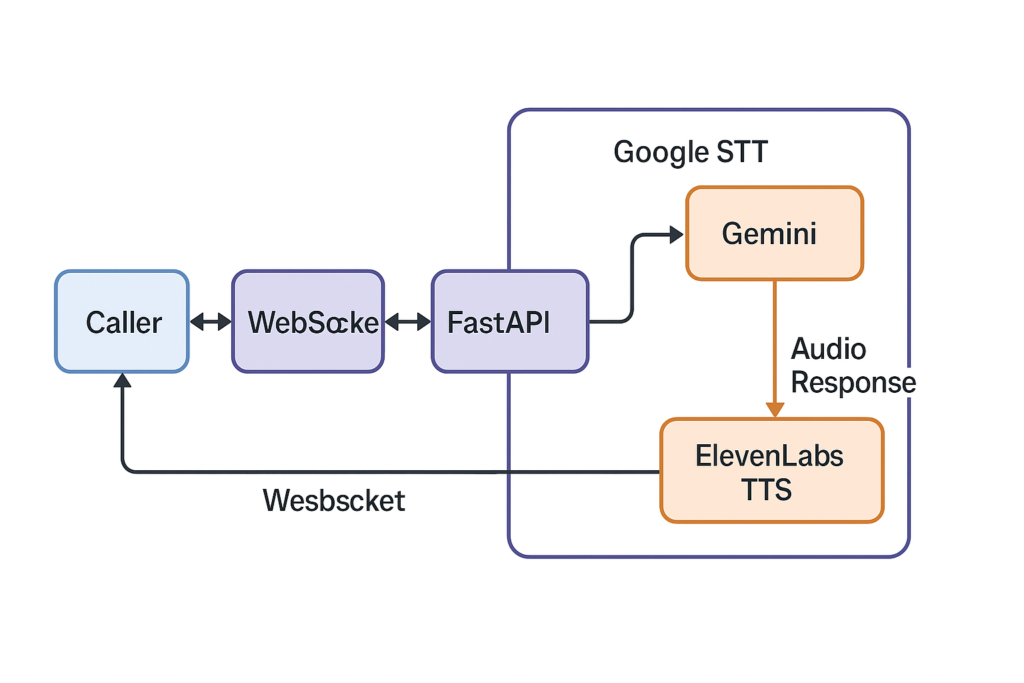
Before diving into code, let’s look at the big picture.
Caller ⇄ Twilio ⇄ WebSocket ⇄ FastAPI ⇄ Google STT → Gemini → ElevenLabs TTS → Audio Response ⇄ Twilio ⇄ Caller
Why Each Part?
- Twilio: Gives us a phone number and live audio via <Stream>, which connects the phone call to our backend via WebSocket.
- WebSockets: Enable persistent, bidirectional audio streams—essential for real-time interaction.
- FastAPI + asyncio: Let us handle concurrent tasks (listening + speaking) smoothly.
- Google STT: Converts raw phone audio (in Greek, or other languages that Google STT supports) into clean, punctuated text.
- Google Gemini: Powers the brain of the assistant with a conversational AI that remembers context and follows an instruction set.
- ElevenLabs: Converts AI responses into ulaw_8000 audio—perfectly tuned for Twilio, and shockingly human in quality.
It’s a beautiful pipeline. Now let’s build it.
3. Step-by-Step: Writing the AI That Picks Up the Phone
We’re building this with FastAPI, async tasks, and WebSockets. Here’s how it all comes together.
Part 1: Initialization and Secrets
We load credentials for Twilio, ElevenLabs, and Google Cloud, then initialize all API clients.
speech_client = SpeechAsyncClient()
elevenlabs_client = ElevenLabs(api_key=ELEVEN_LABS_API_KEY)

vertexai.init(project=GOOGLE_PROJECT_ID, location=VERTEX_AI_LOCATION)
ai_model = GenerativeModel("gemini-2.5-flash", system_instruction=[SYSTEM_PROMPT_GREEK])
We also define the AI’s personality—in this case, a polite medical assistant working for Dr. Tsartsaris. This system prompt guides Gemini’s tone and responses throughout the call.
Part 2: Answering the Phone
When a call comes in, Twilio sends a webhook to /voice. We return a TwiML XML response that connects the call to our WebSocket handler.
@app.post("/voice")
async def voice_webhook(request: Request):
    connect = Connect()
    connect.stream(url=f"wss://{host}/ws/stream/{call_sid}")
    resp = VoiceResponse()
    resp.append(connect)
    return Response(content=str(resp), media_type="application/xml")
Part 3: The WebSocket Handler
This is the conductor. It listens for the call start, sends an initial greeting, and starts two asynchronous tasks: -> One to transcribe and respond <-> One to read audio from the caller
@app.websocket("/ws/stream/{call_sid}")
async def websocket_stream(websocket: WebSocket, call_sid: str):
    await send_elevenlabs_tts_audio("Hello, I am the AI Assistant of YOU COMPANY NAME ...", websocket, stream_sid)
4. Challenge #1: The Lost First Word
🧠 The Problem
Originally, I initialized the Google STT stream inside the response loop. Result? The first word users spoke was consistently lost. Every. Single. Time.
Why?
Because the audio was already coming in before the STT stream was even fully live.
✅ The Fix
I moved the streaming_recognize() call outside the loop. The transcription stream stays hot and persistent for the entire call.
recognize_coroutine = speech_client.streaming_recognize(requests=audio_request_generator())
stream_call_object = await recognize_coroutine
response_iterator = stream_call_object.__aiter__()
Now STT is always ready—and the phantom word problem is gone.
5. Challenge #2: Natural Turn-Taking with Barge-In
Conversations aren’t neatly turn-based. People interrupt. They jump in mid-sentence.
To make this feel real, I implemented full barge-in: the system is always listening, even while it’s talking.
Pros:
- Feels fast and natural
- The AI doesn’t “freeze” while talking
Cons:
- Susceptible to background noise
- More complexity in managing AI/audio overlap
In a future version, I might use Twilio’s <mark> events for stricter turn-taking (e.g., only allow barge-in at sentence boundaries).
But for now, this approach feels the most human.
6. The Star: Streaming TTS with ElevenLabs
Let’s be real: even the best AI falls flat if it sounds robotic.
ElevenLabs solves this in style.
audio_stream = await asyncio.to_thread(
    elevenlabs_client.text_to_speech.stream,
    text=text,
    voice_id=ELEVENLABS_VOICE_ID,
    output_format="ulaw_8000"
)
Each sentence is converted to audio and streamed as it’s generated, using ulaw_8000 encoding for Twilio compatibility. Streaming is key—it lowers latency to the point where you barely notice a delay.
7. Conclusion: What We’ve Built
We now have a system that:
✅ Answers the phone in real time
✅ Transcribes audio with high accuracy
✅ Responds with AI intelligence
✅ Speaks fluently in Greek or any other language Eleven Labs supports.
✅ Handles latency, interruptions, and user flow
This is no longer a robotic IVR. This is a living voice interface, and the tech stack to power it is now accessible to indie developers.
🔮 What’s Next?
Here’s what I’m adding next:
- 📅 Calendar integration: actually book those appointments
- 🧠 Conversation memory: log calls and responses in a database
- 💬 Sentiment detection: spot stress or urgency in the caller’s tone
Let’s talk and learn from each other on Twitter/X and LinkedIn
Comments are closed